
Professional CAD in Browser: CAD Dream Online Drawing Simplifies Secondary Development
Against the tide of digital transformation, the engineering design industry is undergoing profound changes shifting from "local software" to "cloud collaboration". For numerous enterprises and developers, finding a Web-based CAD solution that can meet professional drawing demands, support flexible integration and in-depth customization has become the key to improving efficiency. CAD Dream Online Drawing is a new-generation cloud CAD platform built with cutting-edge technologies. It breaks the reliance of traditional CAD software on operating systems, allowing users to access a professional design workspace anytime and anywhere via only a browser.
CAD Dream Online Drawing Access URL: https://demo2.mxdraw3d.com:3000/mxcad/ Running interface of CAD Dream Online Drawing is shown below: 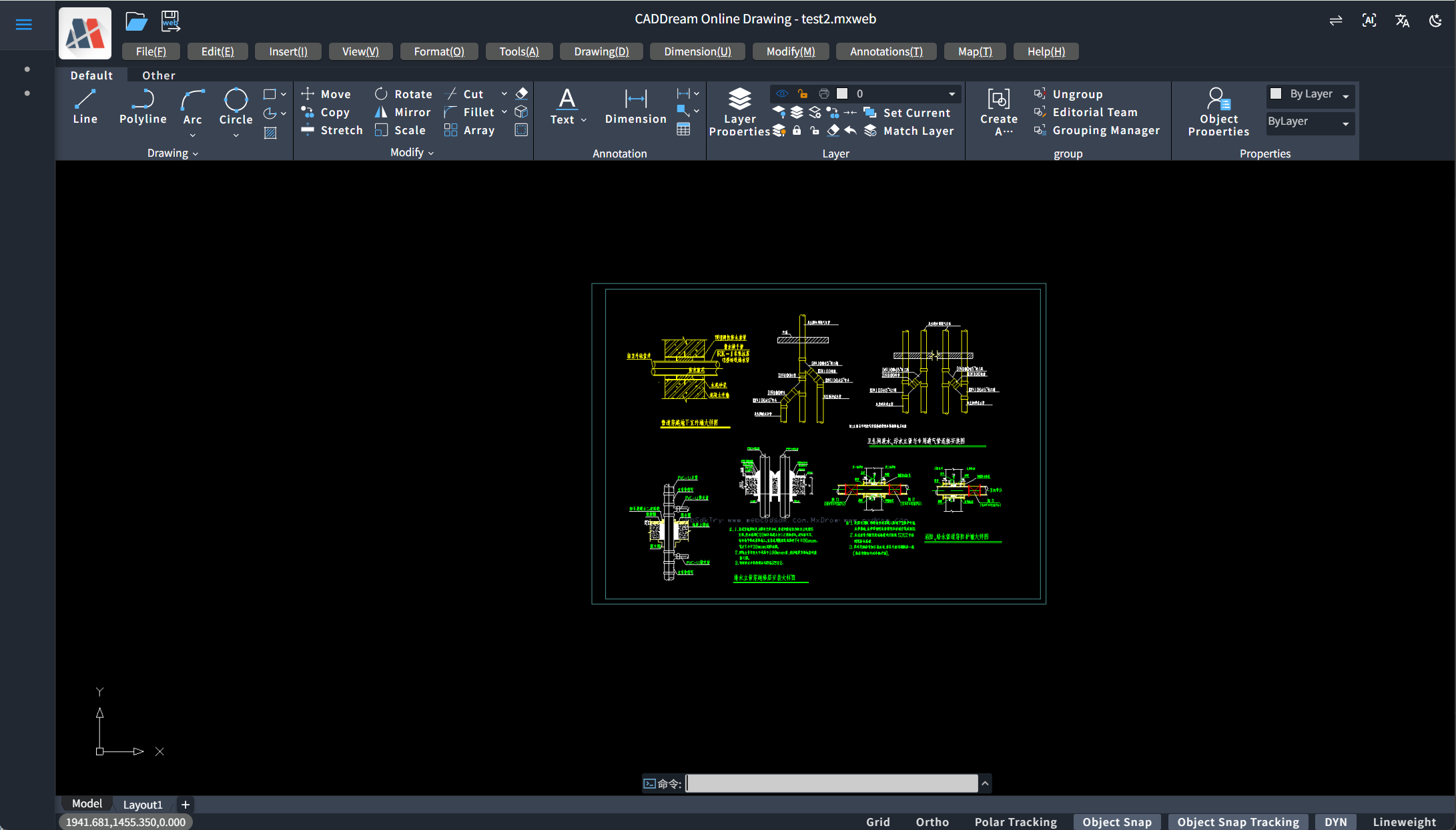
I. What is CAD Dream Online Drawing?
CAD Dream Online Drawing is more than a web-based drawing viewer; it is a fully functional online design and editing system. From the perspective of technical architecture, it is a CAD project deeply developed based on the powerful MxCAD Dream Control kernel combined with the modern Vue3 front-end framework.
This technical combination brings dual advantages: it possesses native-level parsing and rendering capabilities for DWG/DXF formats from the underlying graphics engine, ensuring precise reading of drawing data; meanwhile, it delivers ultra-fast response, component-based development and excellent interactive experience brought by the Vue3 framework. It marks the successful transformation of CAD applications from "heavy client software" to "lightweight Web services".
II. Zero-Threshold Getting Started
For professional CAD users, the biggest concern when migrating from desktop to Web platforms is often not performance, but the disruption of operation habits. Fully aware of this pain point, CAD Dream Online Drawing does not blindly pursue "innovation" in the design of core functional modules; instead, it carries out pixel-level in-depth restoration of AutoCAD, the industry benchmark. Whether it is the visual interface or muscle-memory operation logic, it strives to make users feel "this is AutoCAD running in the browser".
1. High Consistency of Drawing Interface
Upon opening CAD Dream Online Drawing, users are greeted by a highly recognizable dark immersive drawing space, identical to AutoCAD’s classic model space. 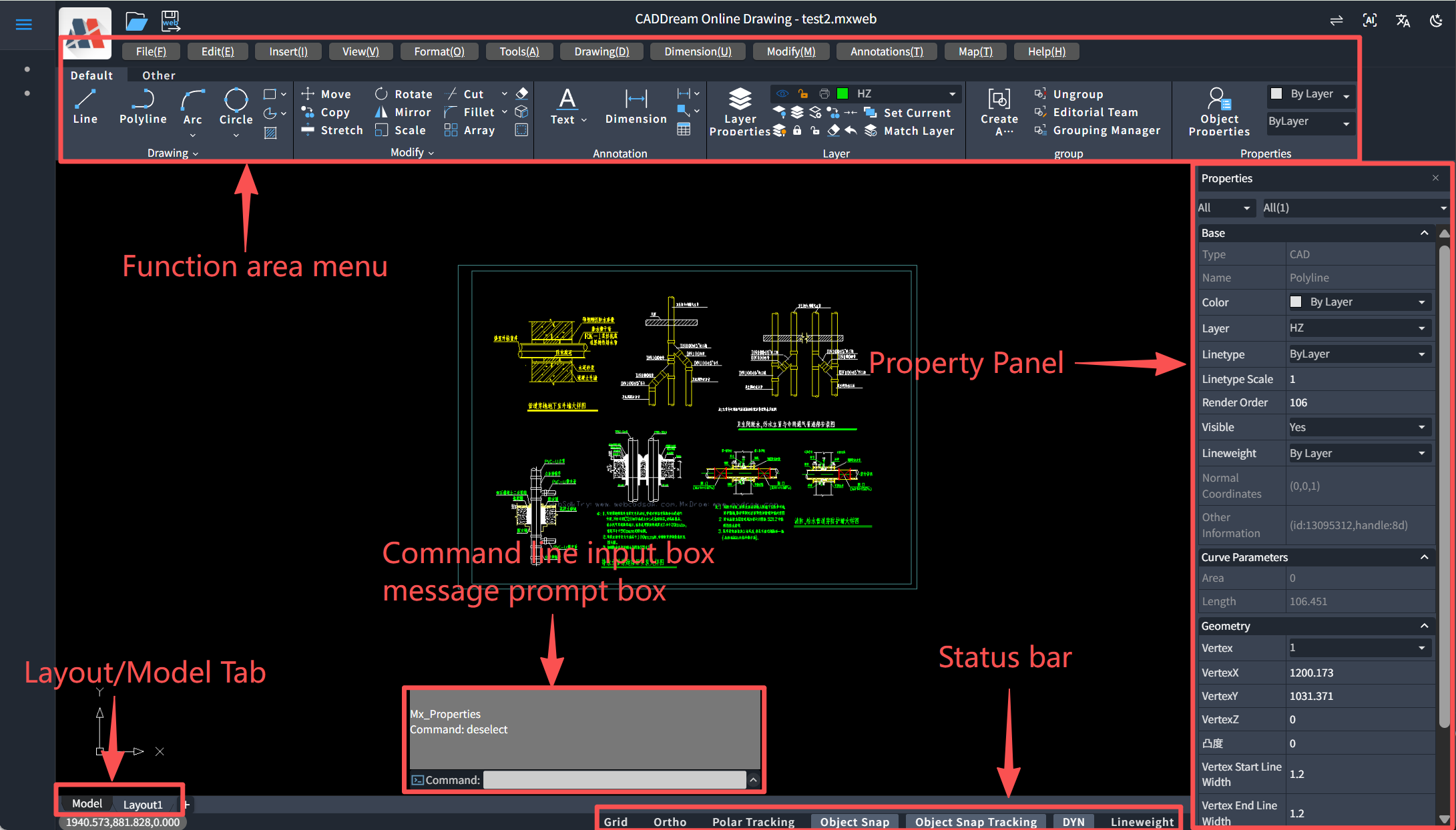
Classic Layout Reproduction: The top of the interface retains standard Ribbon functional menus (File, Edit, View, Draw, etc.), a command line input box and status bar (toggle switches for Snap, Ortho, Polar, etc.) at the bottom, and a detailed Properties panel on the right. This layout fully conforms to engineers’ years of visual habits, enabling users to locate required tools without re-adaptation.
Coordinate System & Navigation: The UCS coordinate icon at the bottom left, Model/Layout tabs at the bottom, as well as middle-mouse pan and mouse-wheel zoom logic are strictly consistent with desktop software.
2. Perfect Inheritance of Operation Habits
True restoration is not merely "similar appearance", but "smooth operation". CAD Dream Online Drawing fully replicates AutoCAD’s interaction logic:
Command Line Driven: It is one of the few Web systems that fully retains command line interaction. Users can directly input
Lfor lines,Cfor circles,TRfor trim,Mfor move just like in traditional CAD. This efficient keyboard operation workflow is completely preserved to guarantee undiminished drawing efficiency.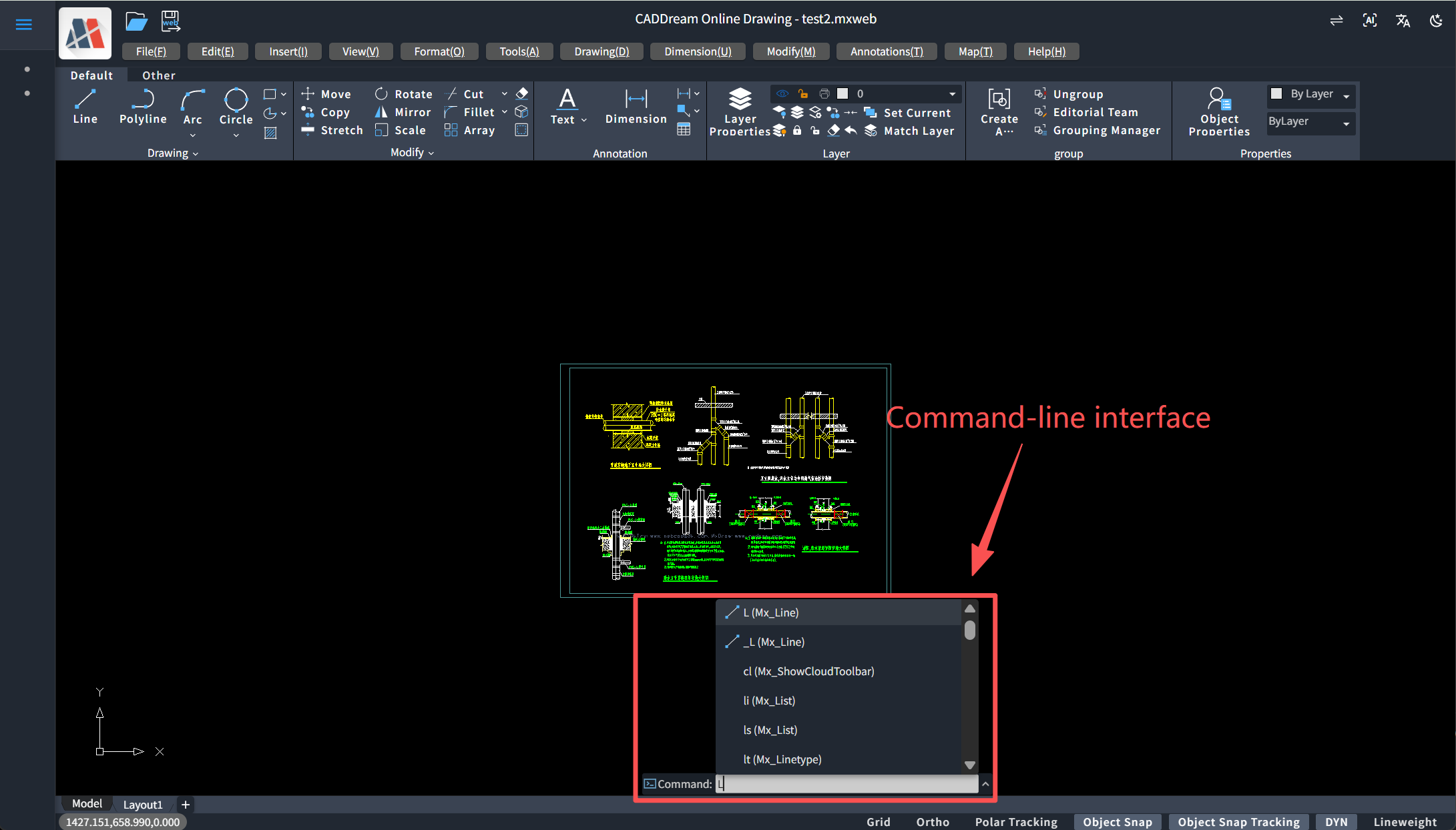
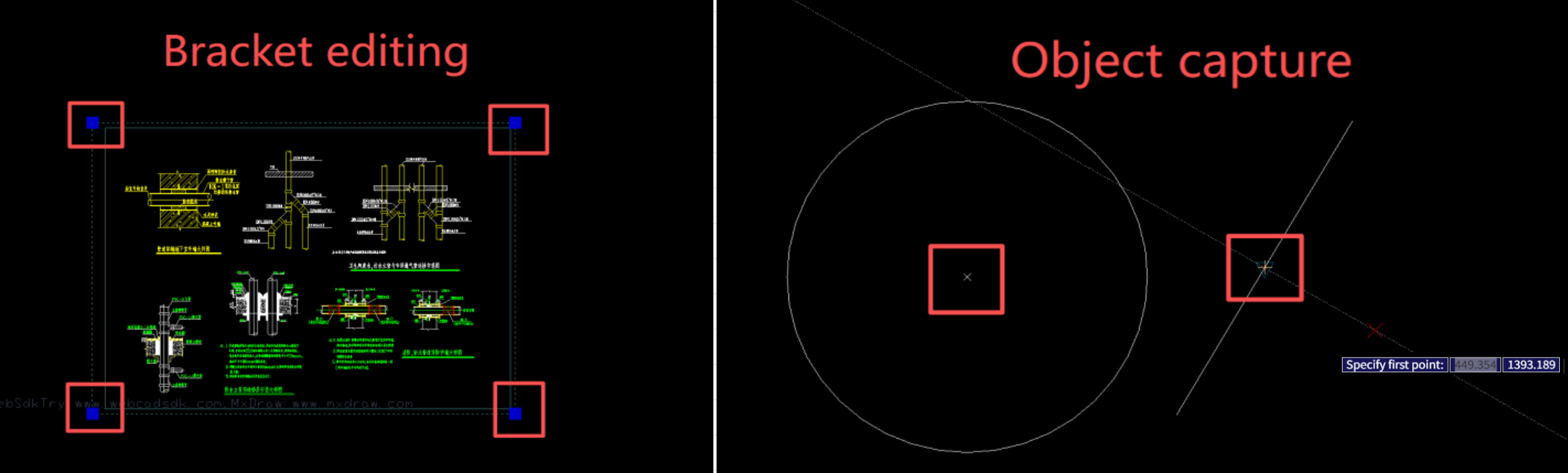
Grip Editing & Object Snap: Blue grips appear after selecting graphics, supporting quick operations such as stretch, move and rotate; object snap markers (green boxes, triangles, etc.) automatically trigger when the cursor approaches endpoints, midpoints, circle centers, with sensitivity and display styles reaching the precision standard of desktop software.
Right-Click Menu & Shortcuts: Common functions including right-click confirmation, repeat last command, and universal shortcuts such as Ctrl+C/V/Z are natively supported.
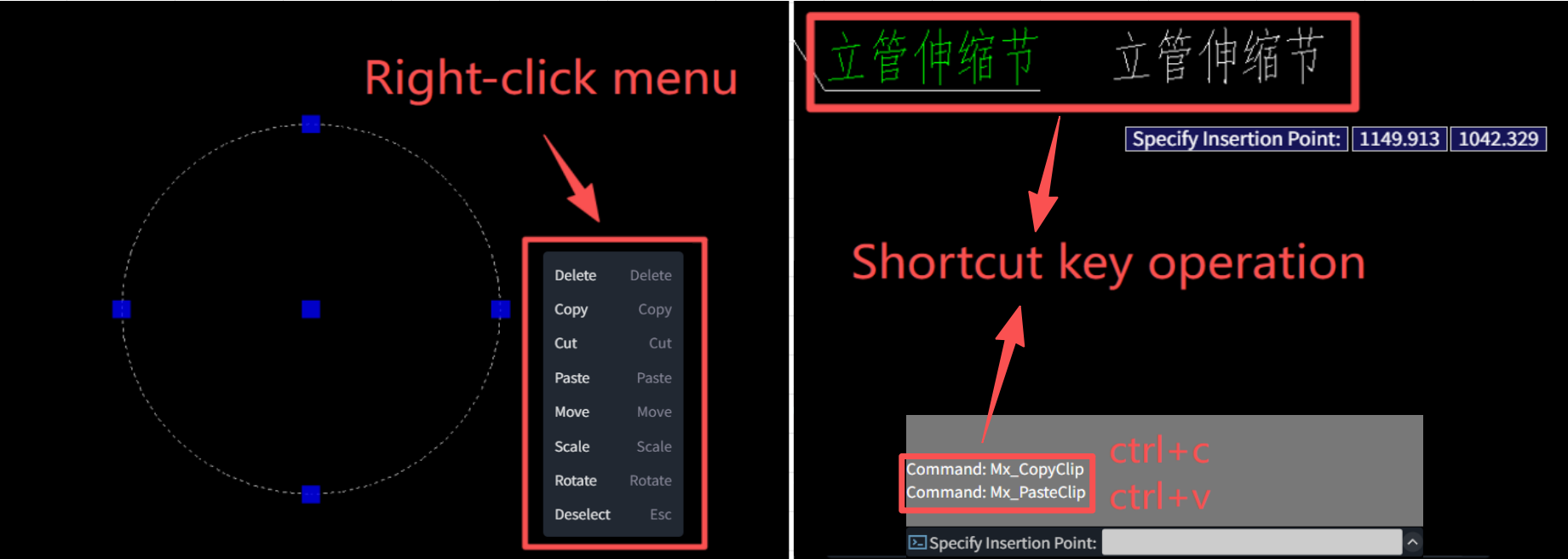
Through this all-round restoration from visuals to operation experience, CAD Dream Online Drawing eliminates the gap between Web and desktop platforms, allowing senior designers to get started with zero learning cost.
III. Detailed Explanation of Each Module Function
CAD Dream Online Drawing aims to build a "cloud-based AutoCAD" product. Its strength lies not only in interface restoration, but also in solid and complete internal functional modules. By deeply polishing each core module, it constructs a powerful design environment that conforms to traditional workflows while retaining Web-side flexibility.
1. Drawing & Editing Module
It reproduces desktop-level operation experience with extreme refinement for drawing and editing, the core work area of designers. 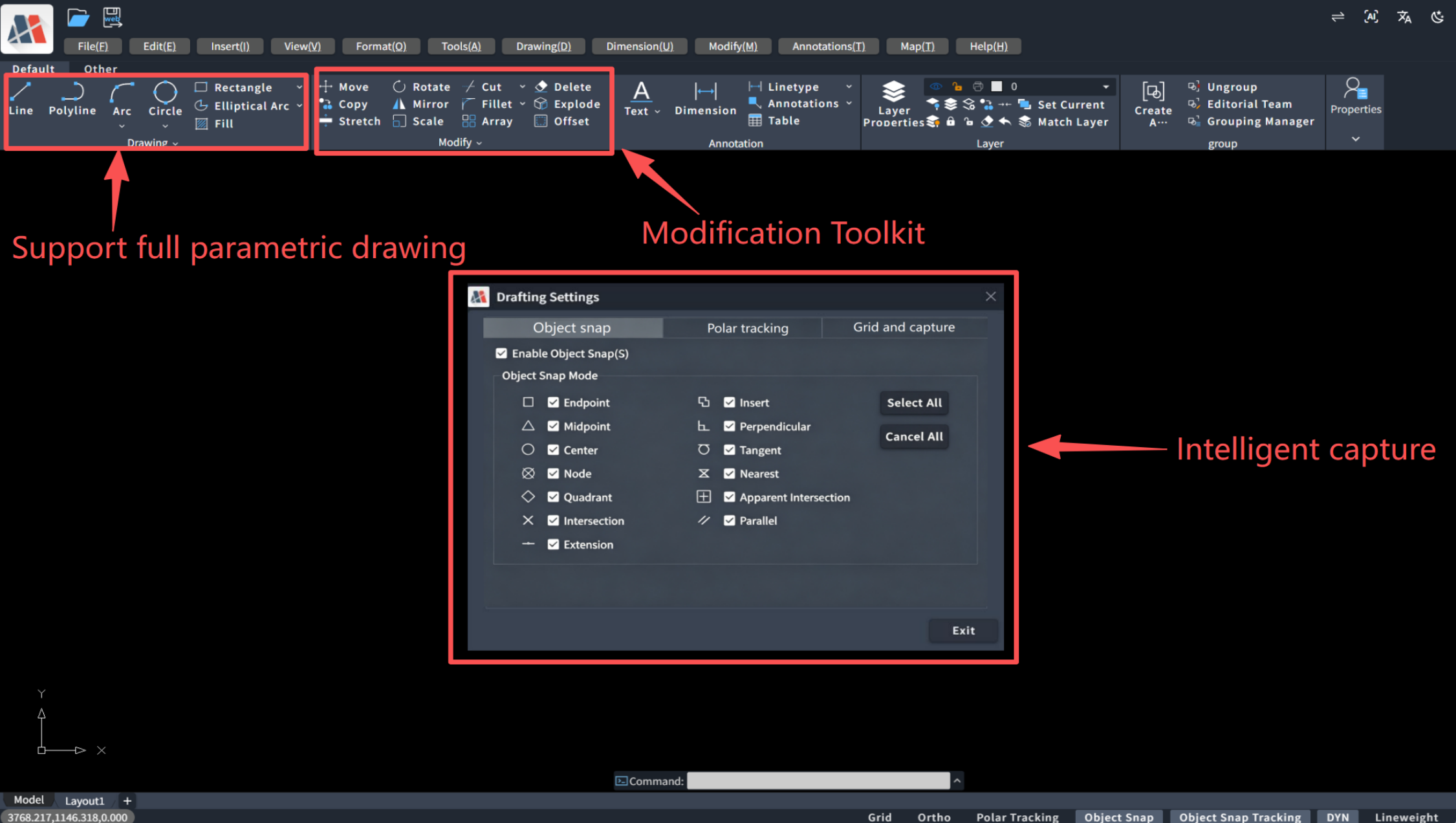
Full Parametric Drawing: It provides standard drawing tools including lines, polylines, circles, arcs, rectangles, regular polygons, etc. Users can input coordinates or relative distances via the command line for precise drawing, fully satisfying engineers’ pursuit of accuracy.
Powerful Modification Toolset: All common modification commands are available, including Move, Copy, Rotate, Mirror, Offset, Array, Trim, Extend, Chamfer, Fillet, etc. Especially the grip editing function: blue control points appear after selecting objects, supporting direct stretch, scale or rotate with extremely sensitive interactive feedback.
Intelligent Snap System: It inherits AutoCAD’s object snap logic with clear markers for endpoints, midpoints, circle centers, tangent points, perpendicular points, etc., enabling quick positioning of key points even in complex drawings.
2. File Operation & Data Management Module
It seamlessly connects to local ecosystems, breaks the limitations of browser sandboxes, and realizes free interaction with local files: 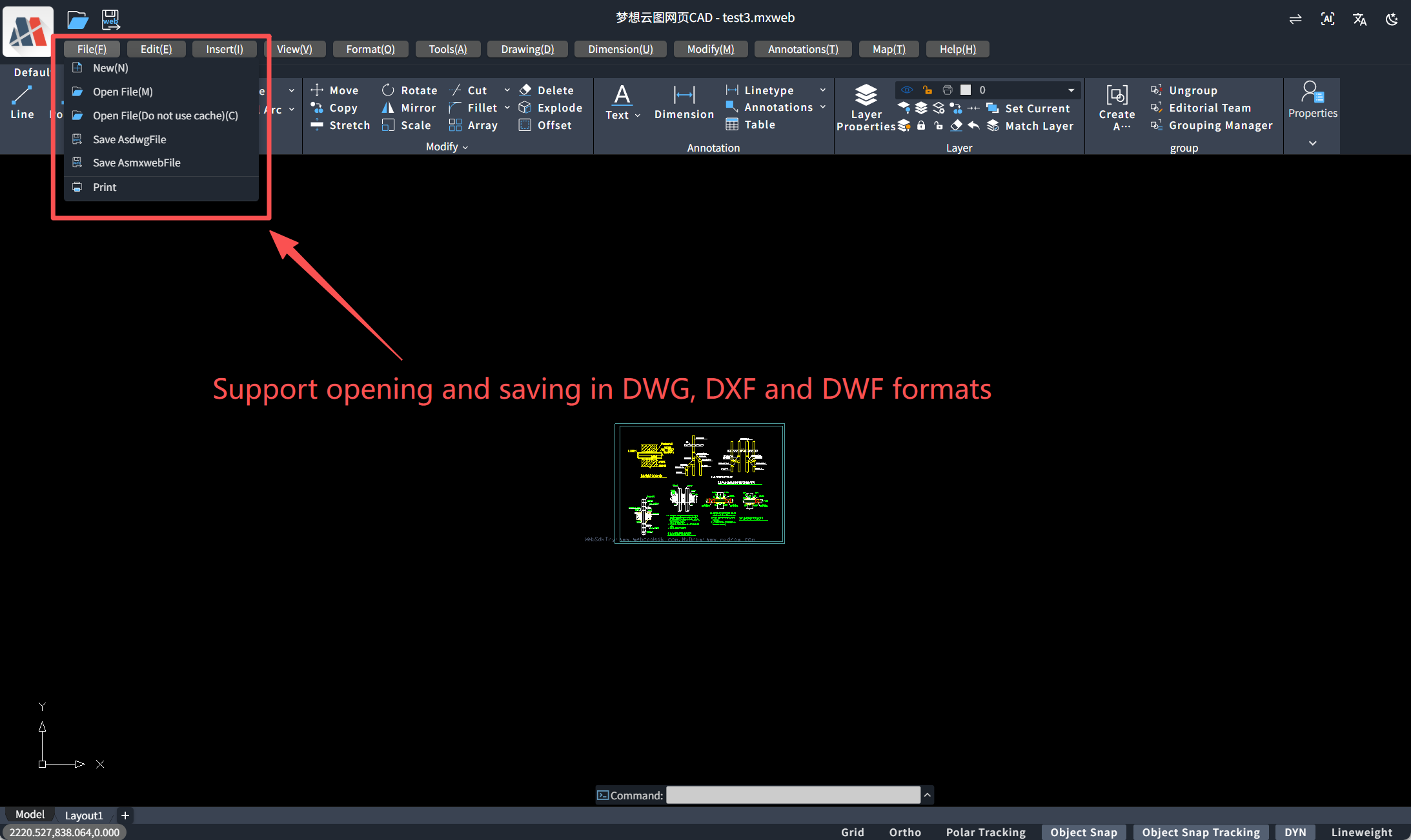
Multi-Format Compatibility: It natively supports opening and saving
.dwg,.dwfand.dxfformats. Both high and low version drawings maintain ultra-high parsing fidelity without garbled text or missing drawing elements.Cloud & Local Interoperability: Beyond traditional Open/Save dialog boxes, it supports loading drawings from servers or saving to cloud databases, laying the foundation for subsequent collaborative work.
3. View Control & Layer Management Module
It delivers a top-down global view and provides professional solutions for browsing and managing complex drawings: 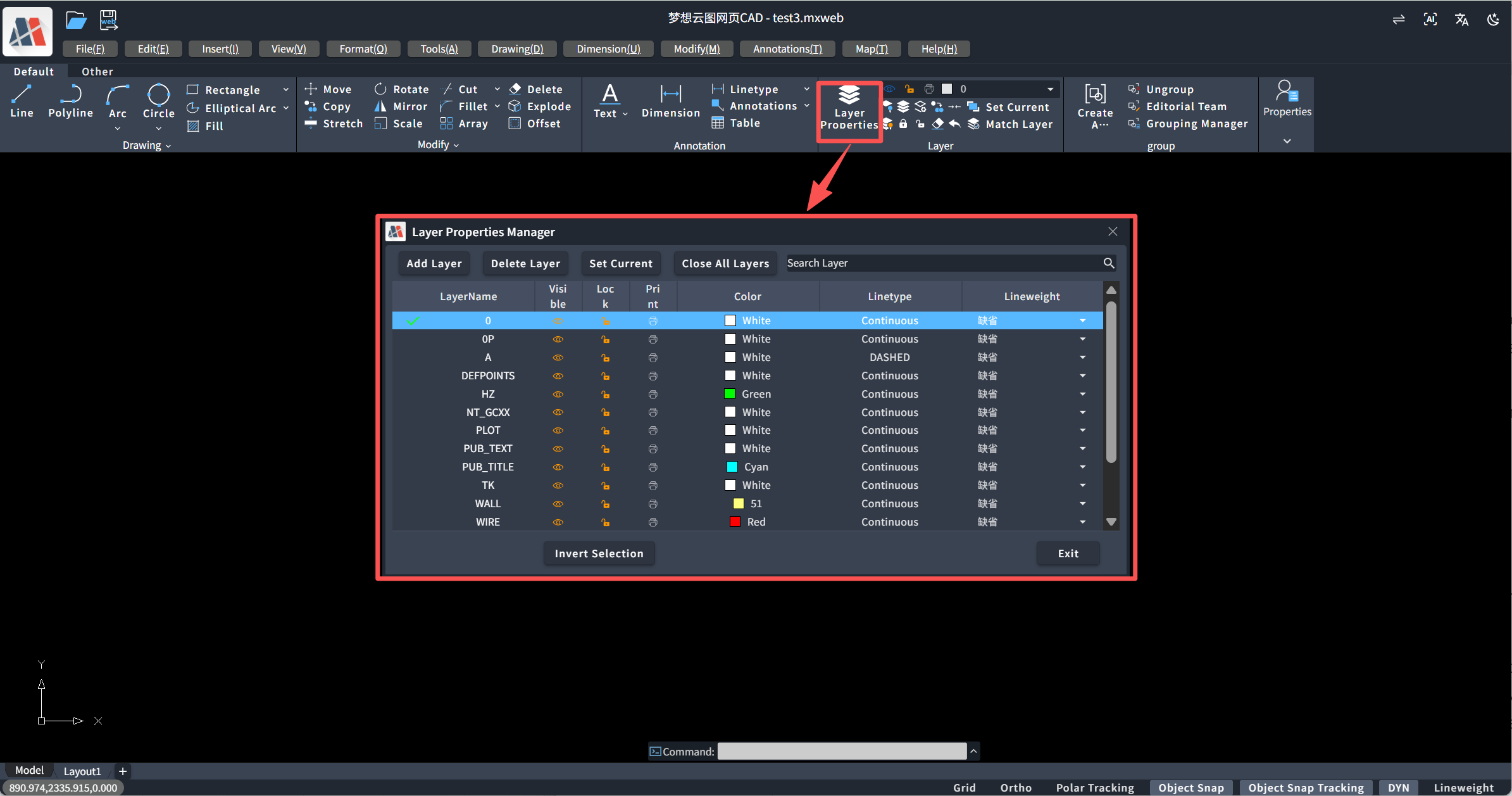
Smooth View Navigation: Supports middle-mouse pan and stepless mouse-wheel zoom. The UCS icon at the bottom left reflects the current coordinate system direction in real time, and switching between Model/Layout tabs at the bottom is fluid.
Fine-Grained Layer Control: It features an independent layer manager supporting layer visibility toggle, freeze, lock, as well as color and linetype configuration. Users can organize complex graphic information via layers just like in traditional CAD software.
4. Properties Panel & Block Management Module
For complex block data and object organization in drawings, CAD Dream Online Drawing delivers accurate and efficient management tools to guarantee precise data entry and component calling.
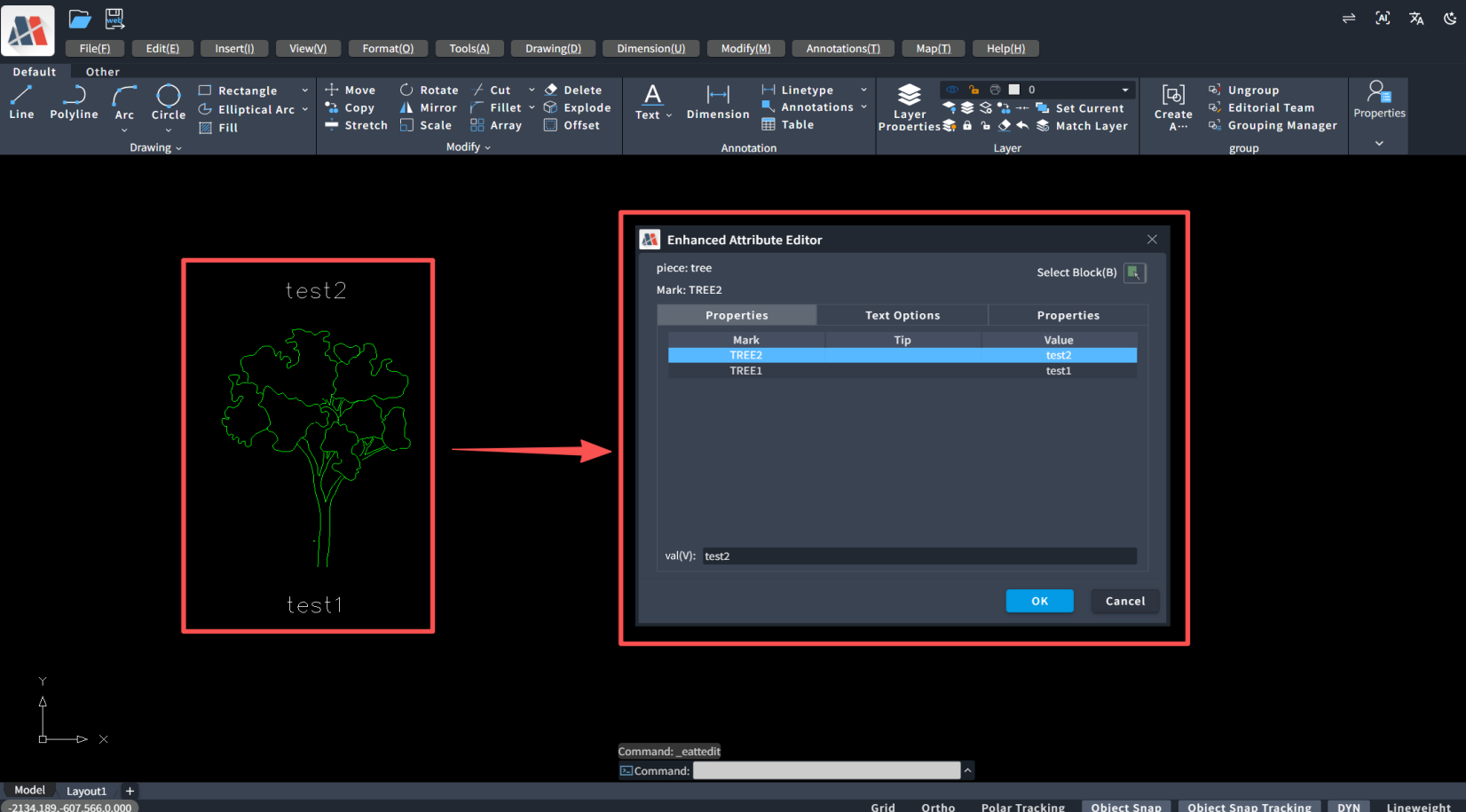
Accurate Block Attribute Editing Despite its lightweight Web positioning, it makes no compromises on core data interaction. The software supports an enhanced attribute editor, allowing users to intuitively view and modify attribute tags, prompts and values inside blocks (such as equipment numbers, specifications and models). This WYSIWYG editing method enables fast entry and standardization of drawing information, meeting strict accuracy requirements for engineering drawings.
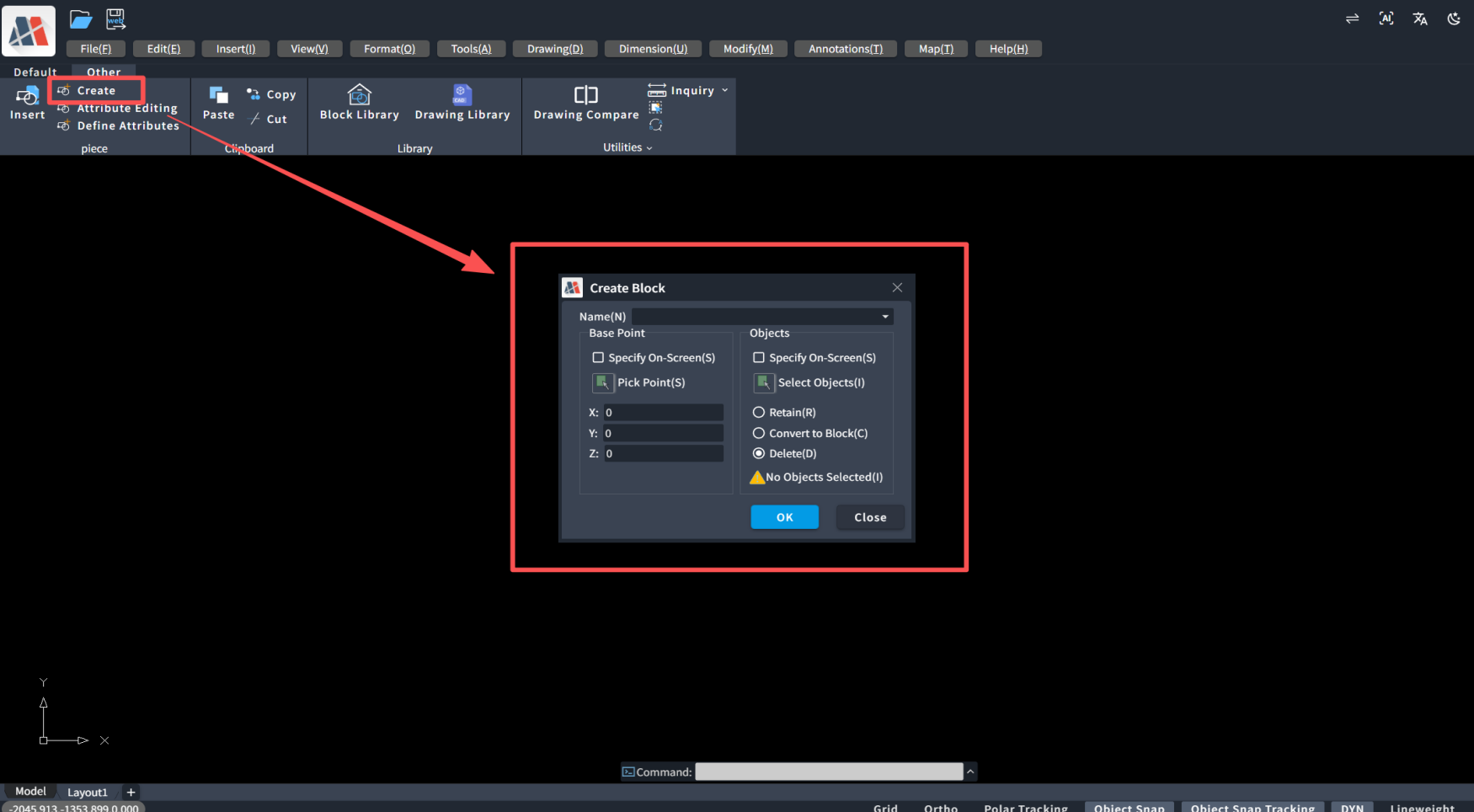
Flexible Block Creation & Management It comes with a complete block creation function, enabling users to directly define block names, specify base points and select objects for encapsulation on web pages. Whether converting common symbols into standard blocks or reorganizing existing graphics, operation logic remains consistent with desktop versions, greatly boosting drawing efficiency.
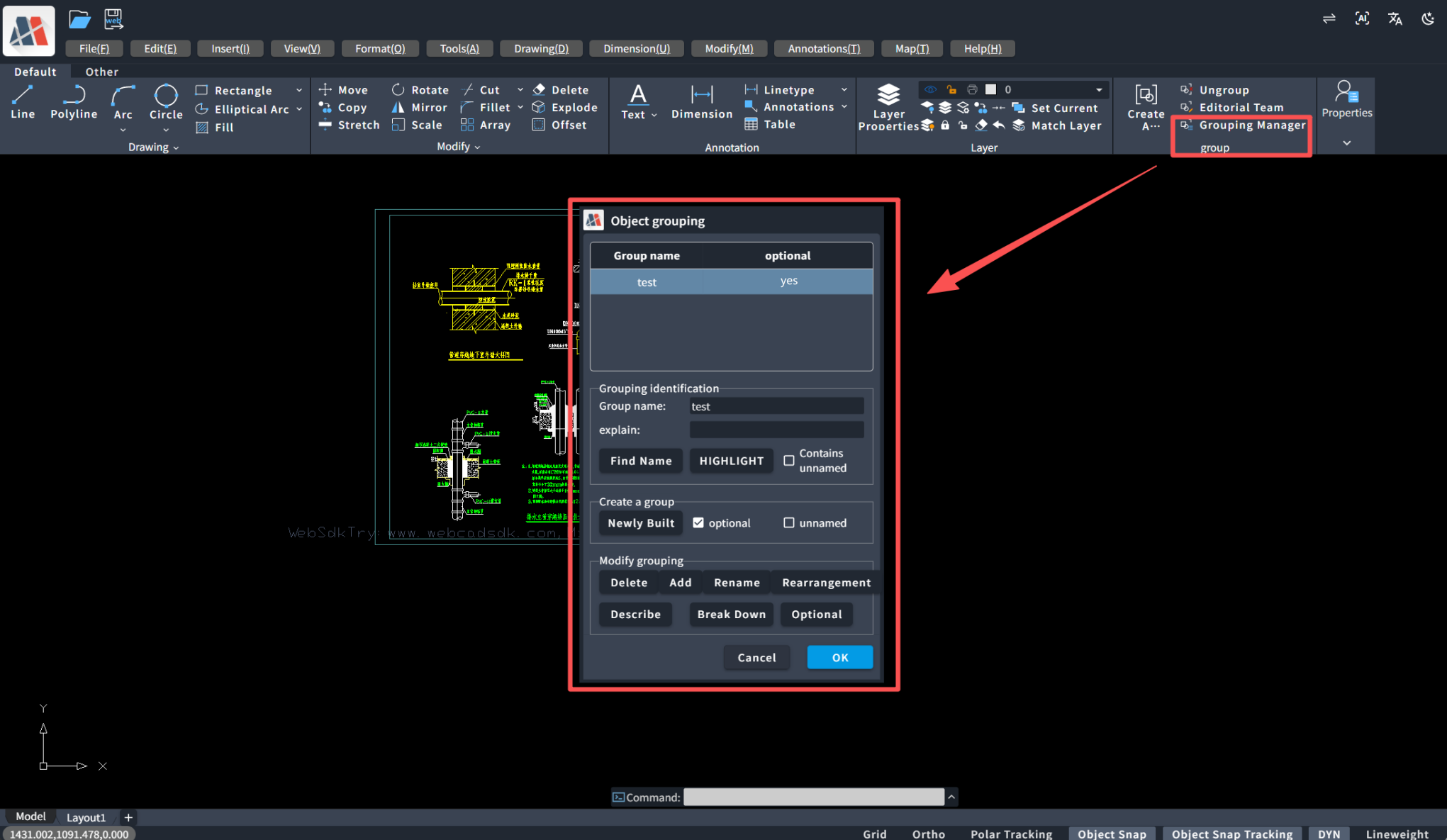
Convenient Object Grouping Function For graphic sets that do not need to be defined as blocks but require unified management, the software provides group creation and a group manager. Users can easily combine scattered lines or text into a whole for move, copy and other operations, while also supporting ungrouping or editing internal members at any time, bringing great flexibility for organizing complex drawings.
5. Extension Tools & Plugin Module
Beyond basic functions, CAD Dream Online Drawing boasts powerful scalability. The "My Extension Tools" panel as shown integrates advanced tools including multiple copy, arc to circle, circle to polygon, PI fillet, etc. This proves the platform is not merely a drawing tool, but an extensible development platform. 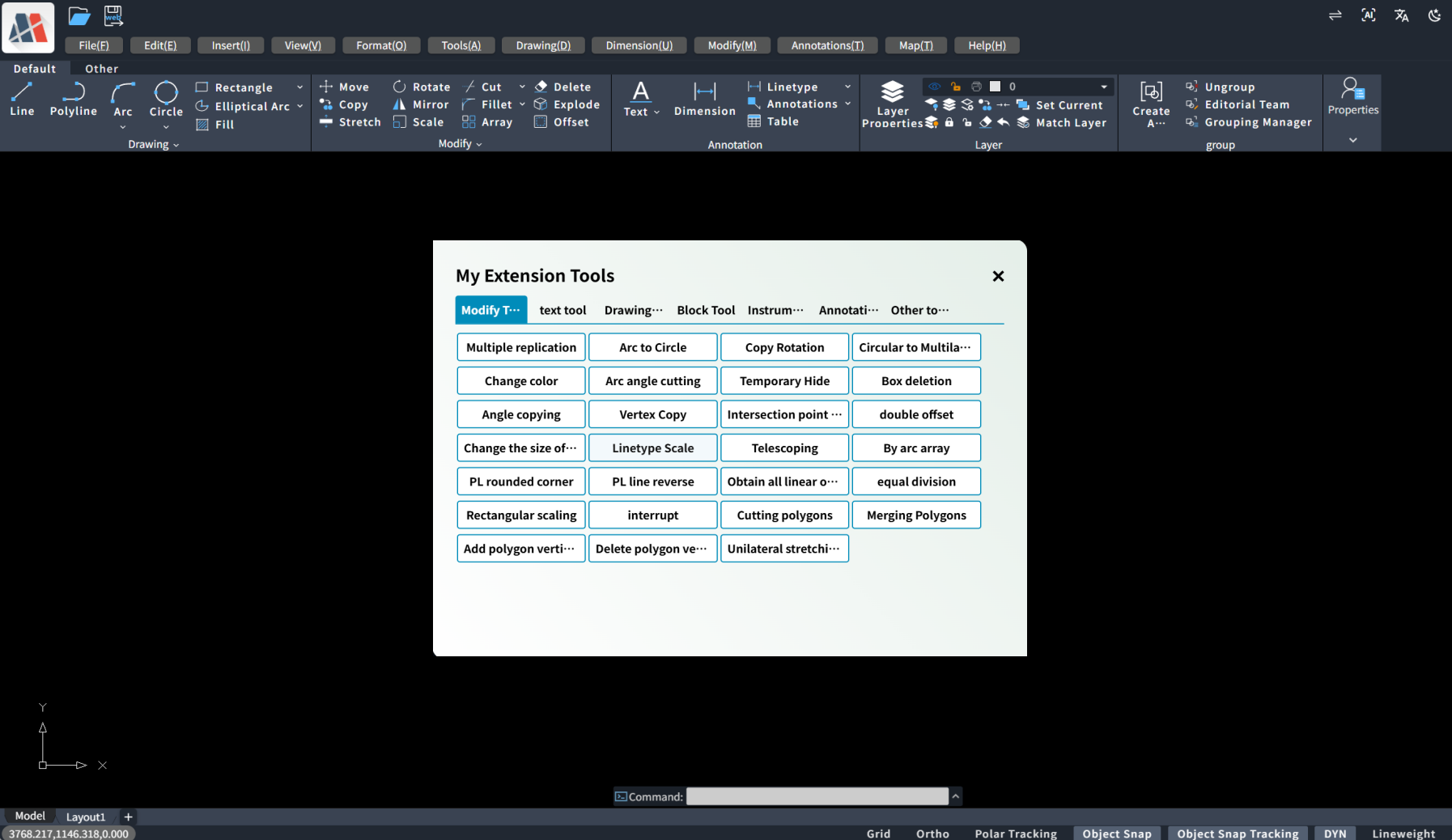
IV. Flexible Integration & In-Depth Secondary Development
CAD Dream Online Drawing is not only an independent cloud CAD application, but also a powerful PaaS (Platform as a Service) development base. It provides diverse flexible integration schemes and in-depth customization capabilities for enterprises and developers, enabling seamless embedding into existing business systems and supporting secondary development based on the MxCAD kernel to meet various personalized demands.
1. Two Integration Methods for Flexible Adaptation to Different Scenarios
To adapt to diverse technical architectures and business scenarios, CAD Dream Online Drawing offers two mainstream integration approaches:
NPM Package Integration: For projects adopting modern front-end frameworks (Vue, React, etc.), deep integration via NPM packages is available. Developers only need to run
npm install mxcad-appto embed full CAD functions into their own systems like importing ordinary components. This method features low coupling and facilitates deep customization and function expansion, making it the preferred solution for implementing complex business logic. Detailed integration documentation: https://help.mxdraw.com/mxcad/zh/docs/7.BestPractice/1.MxCADAppNpmApplicationIntegration.htmlbashnpm install mxcad-app # Or yarn add mxcad-appIframe Embedding Integration: For scenarios requiring rapid integration or minimal intrusion to existing systems, Iframe embedding is applicable. Simply provide a URL to embed CAD Dream Online Drawing as an independent application module into any web page. This method delivers fast and simple implementation, quickly equipping systems with professional CAD capabilities. Detailed integration documentation: https://help.mxdraw.com/mxcad/zh/docs/7.BestPractice/2.MxCADAPPApplicationIntegration/1.BasicDescriptionOfProjectIntegration.html
html<iframe src="https://mxcad.com" title="Online CAD Page"></iframe>
2. In-Depth Personalized Customization to Build Exclusive CAD Experience
CAD Dream Online Drawing provides abundant configuration files for enterprises to conduct thorough personalized customization, fully aligning the CAD project with corporate brand images and business workflows.
UI Interface Customization: Configuration files allow modification of application titles, Logos, theme colors (supporting light/dark mode switching), and even visibility and layout of top menu bars, left toolbars, right-click menus and other UI elements to build exclusive CAD workstations meeting corporate standards.
Function & Command Customization: Users can hide or display specific functional modules according to business needs, and add custom shortcut commands and aliases to optimize designers’ operation workflows and improve efficiency.
Service Configuration: Backend service addresses for drawing upload, saving, printing and other operations can be flexibly configured to easily connect with internal enterprise PLM, ERP or OA systems, realizing seamless data flow between drawing data and business data.
3. In-Depth Secondary Development Based on MxCAD API
The true potential of CAD Dream Online Drawing lies in its open secondary development capabilities. Developers can directly call rich API interfaces provided by the MxCAD kernel to implement personalized functions beyond traditional CAD software.
Parametric Drawing: Scripts can be written via APIs to realize parametric and automated drawing functions. For example, input length and width parameters to generate standard drawing frames with one click; or automatically generate corresponding equipment blocks based on equipment parameters stored in databases.
Business Logic Extension: CAD drawing can be deeply bound to specific businesses. For instance, develop plugins to realize two-way association between drawing graphics and enterprise BOM (Bill of Materials) databases — select graphics to view or modify their material information; or build one-click tools to count area and length and generate reports.
Custom Entities & Tools: For specific industries (electric power, HVAC, steel structure, etc.), exclusive drawing tools and custom entities can be developed to simplify complex drawing processes into a few simple operations, greatly boosting efficiency in professional fields.
In summary, with flexible integration modes, in-depth customization capabilities and powerful secondary development potential, CAD Dream Online Drawing provides enterprises with a low-cost, high-efficiency graphical transformation solution. It is not only a cloud-based tool for designers, but also the core engine for enterprises to build digital design ecosystems.